Equipment Positions
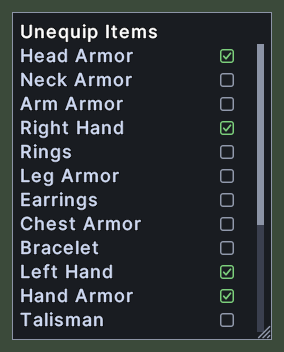
The equipment positions window picks which parts of your body a hotbar slot's equipment action works on. It lists the positions, such as Head Armor, Right Hand, Left Hand, Hand Armor and Talisman, with a mark beside each one that the slot uses.
The window has two modes. For a slot that holds an arm or disarm action, the window is titled Slot, and the chosen position wears a tick. For a slot that holds an unequip action, the window is titled Unequip Items, and every position that the slot takes off wears a checkbox.
Opening it
- Shift+right-click a hotbar slot that holds an arm or disarm action, or an unequip action, and choose Edit Item.
- Choosing Edit Item on another slot while the window is open moves the window to that slot. If the other slot holds the other kind of action, the window changes its title and its marks to fit.
- A right-click closes the window.
Using it
- In the Slot mode, click a position to make it the slot's choice. The tick moves to that row.
- In the Unequip Items mode, click a position to add it to the set that the slot takes off. Click a checked position to take it out again.
- Roll the mouse wheel over the list to scroll it.
- Drag the window to move it. Drag the corner grip to resize it. With the Lock the layout setting on, the window cannot be dragged.
- Right-click to close the window.