Actions
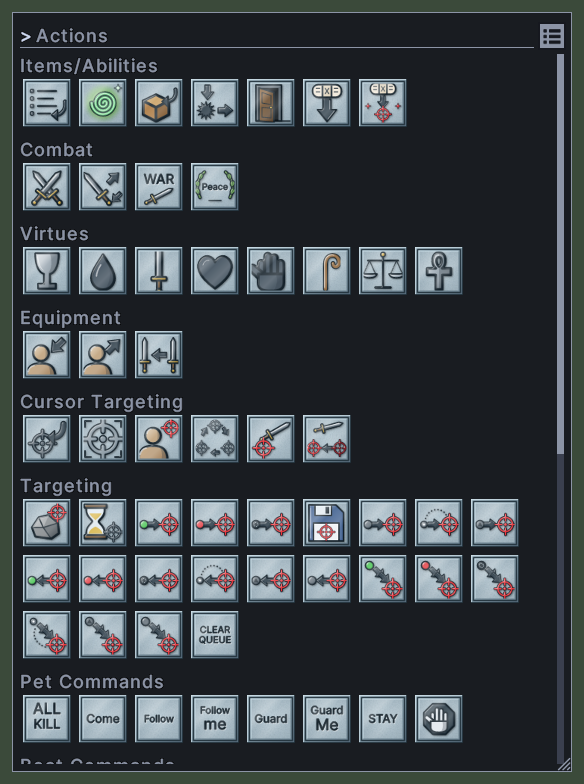
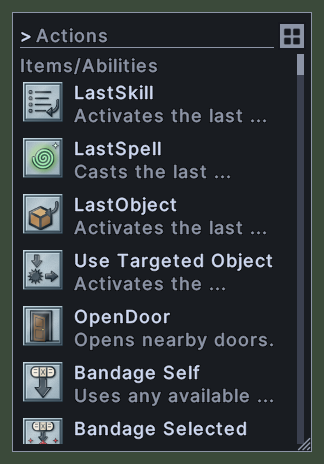
The Actions window lists the things you can put on a hotbar or in a macro that are not a spell, a skill or an item. These are the actions for bandaging, war and peace, virtues, targeting, pet commands, boat commands and speech, and the shortcuts to this UI's own windows. Each action shows its picture, and the list also shows its name and a line about what it does.
The actions stand under a heading for each group, such as Items/Abilities, Combat and Pet Commands. The last group, Menu Actions, holds the shortcuts that open this UI's windows. The list can show each action as a row or as a grid of pictures.
Opening it
- The Actions action, in the Menu Actions group of this window, shows it and hides it again. You can put that action on a hotbar.
- Actions in the main menu opens the window or closes it.
- Actions in the paperdoll's menu opens the window.
- The Actions button at the bottom of the Macros window opens it, so that you can drag an action into a macro.
- A right-click closes the window.
Using it
- Drag an action onto a hotbar slot to put it there. Drag it onto an empty step of a macro to add it to the macro.
- Double-click an action to run it, for the actions that can run from here. These are the war mode action and the actions in the Menu Actions group. Any other action runs from a hotbar slot.
- Type in the find box at the top to show only the actions whose names match. Press Escape to empty the box.
- Click the button beside the find box to switch between the list and the grid. The window remembers your choice.
- Hover over an action to read its name and what it does.
- Roll the mouse wheel to scroll the window.
- Drag the corner grip to resize the window.
- Right-click to close the window.
Changes
v1.0.0-alpha.1
- The Actions window lists every action in groups, as rows or as a grid of pictures.