Buffs
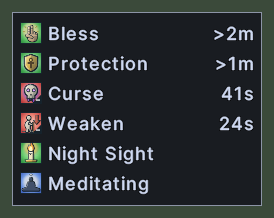
The buff bar lists the buffs and debuffs that are running on your character, such as Bless, Curse or Night Sight. Each row shows the effect's picture and name. If the effect runs for a set time, the time left stands at the right end of the row.
The bar grows to hold every effect and gets shorter as effects end. A time under a minute counts in seconds, a longer one in minutes, and a very long one in hours. A mark of ">" before a number means that the time left is a little more than it says. In its last ten seconds an effect's picture pulses.
Opening it
- The Buffs action, in the Menu Actions group of the Actions window, opens or closes the bar. You can put the action on a hotbar.
- On your own paperdoll, click the three dots at the top right and choose Buffs.
- If the bar was open when you logged out, it opens again when you log in.
- A right-click anywhere on the window closes it.
Using it
- Hover over an effect to read its name and what it does.
- Drag the bar to move it.
- Right-click to close the bar.
Changes
v1.0.0-alpha.1
- The buff bar lists your buffs and debuffs, with the time left on each.