Channels
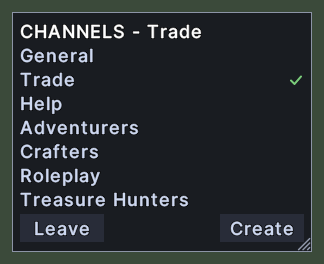
The Channels window lists the chat channels that the server offers and shows the one you are in. The title names your channel after the word CHANNELS. A tick stands at the right end of the row of the channel you are in.
You can be in one channel at a time. Joining another leaves the last one.
Opening it
- The Channels action, in the Menu Actions group of the Actions window, opens the window and closes it again. You can put the action on a hotbar.
- The Channels entry in the chat menu opens it too. The chat menu opens from the button on the chat line, and from Shift+right-click on the chat.
- The window closes when you open it again from either, and a right-click anywhere on the window closes it.
Using it
- Double-click a channel to join it. Double-clicking the channel you are already in does nothing.
- Hover over a channel to read what a double-click will do.
- Click Leave to come out of your channel. The button shows only while you are in one.
- Click Create to type a name for a new channel. A blank name is not sent.
- Roll the mouse wheel over the list to scroll it.
- Drag the corner grip to resize the window.
- Right-click to close the window.
Changes
v1.0.0-alpha.1
- The chat has a menu for channels, Global Chat friends and ignore lists.