Character Sheet
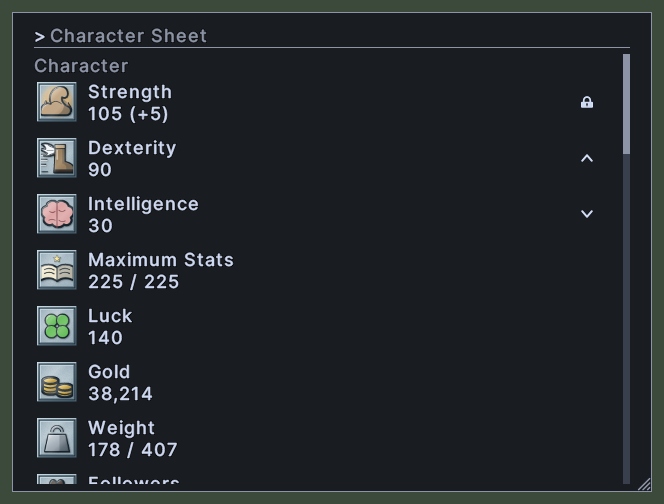
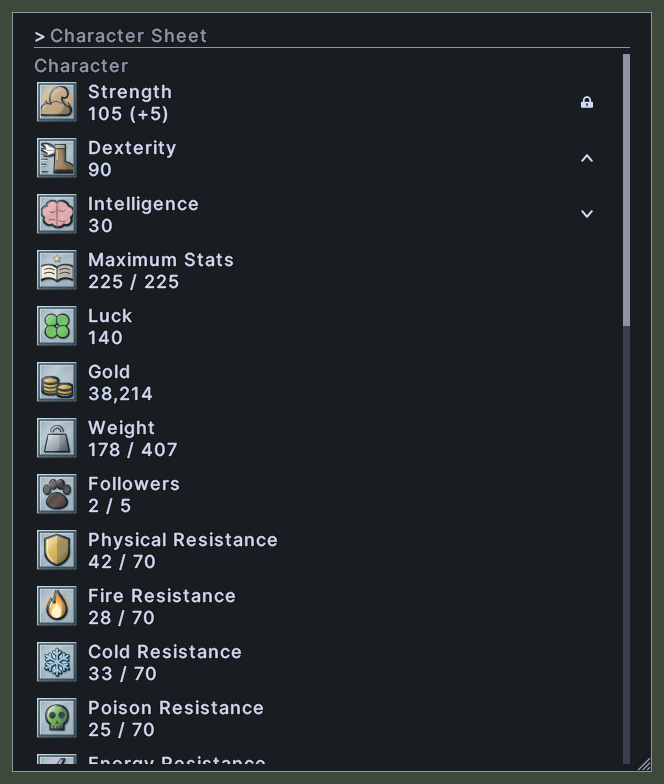
The character sheet lists your stats, one row to a stat, in four groups: Character, Attack, Magic and Defense. Each row shows the stat's picture, its name and its current value, such as your strength, your gold, your weight or a resistance.
Strength, Dexterity and Intelligence also carry a lock at the right end of the row. Your weight is drawn in red when you carry more than you can bear.
Opening it
- The Character sheet action, in the Menu Actions group of the Actions window, opens or closes the sheet. You can put the action on a hotbar.
- On your own paperdoll, click the three dots at the top right and choose Character.
- A right-click anywhere on the window closes it.
Using it
- Type in the box at the top to show only the stats whose names match. Press Escape to empty the box.
- Click the lock on Strength, Dexterity or Intelligence to change it. Each click moves it to the next of three states: up, down and locked. You can also click anywhere on the row.
- Control+click a stat to put that stat on the screen as a small readout of its own. Control+click it again to take the readout away. See the Quick Stat page.
- Hover over a stat whose name is cut off to read it whole.
- Roll the mouse wheel over the list to scroll it.
- Drag the window to move it.
- Drag the corner grip to resize the window.
- Right-click to close the window.
Changes
v1.0.0-alpha.1
- The character sheet lists your stats in four groups under a find box, and a stat can be shown on screen as a Quick Stat.