Container
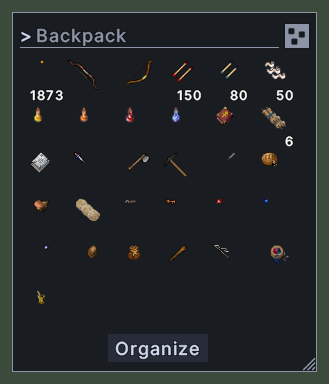
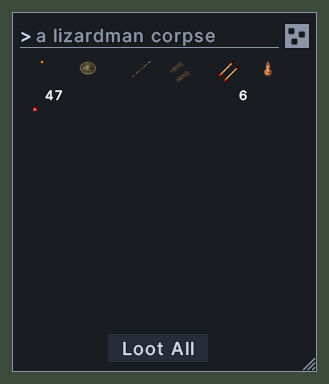
A container window shows what is inside a backpack, a bag, a box or a corpse. Each item is a small picture in a grid of cells, and a stack of items shows its count under the picture. The bag's name stands at the top, in the box where you can type to search the bag.
Every container you open gets a window of its own. The windows open a step apart, so that each one leaves the title of the one beneath it in reach. Your backpack opens where you last left it. The other containers share one size, which is the size you last dragged a container to.
Opening it
- Double-click a bag, a box or a corpse in the world, or in another container, and the server opens it.
- The backpack key in the client's key settings opens your backpack, and closes it again.
- The Backpack action, in the Menu Actions group of the Actions window, does the same. You can put the action on a hotbar.
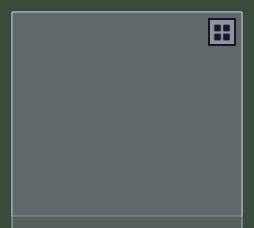
- The freeform view button closes the window and opens the bag again in the freeform view.
- A right-click on the window's padding or footer closes it. A right-click on an item closes the window too.
Using it
- Double-click an item to use it. Double-click a bag to open it in a window of its own.
- Press on an item and drag it to pick it up. Release it on a cell or on the window to drop it into this container.
- Control+press on a stack and drag to take one item from it.
- Drag the window by its padding to move it. With the Lock the layout setting on, it stays where it is.
- Roll the mouse wheel over the window to scroll the rows.
- Drag the scroll bar to move through the rows.
- Hover over an item to read its name and its properties.
- Type in the box at the top to show only the items that match. Words are matched against item names and properties, and every word has to match. Put
oror|between words to accept either one. Put-ornotbefore a word to leave out items that match it. - A search also looks inside the bags in this container. Matches found there join the end of the list, and the box's tooltip names the bags that hold them.
- Press Escape in the box to empty it and show everything again.
- Click Loot All on a corpse to move its items into your backpack one at a time. It becomes Stop while it works, and a second click stops it. When the box holds a search, the button reads Loot with the number of matches, and only the matches move.
- On a container that is not a corpse, the footer button appears only once the box holds a search. It reads Take with the number of matches, and it moves them into your backpack. Your own backpack never shows it.
- Click Organize to move items by the rules of your chosen profile in the Organizer window. When the profile has nothing to move, the click opens the Organizer window instead. The button reads Restock when that profile fetches items, and Stop while the work goes on.
- Click the button at the top right to switch between the grid and the freeform view, when the bag has a picture of its own to draw. Hover over it to see which view it leads to.
- Drag the corner grip to make the grid wider, narrower, taller or shorter. Every container then opens at that size.
- Shift+right-click an item on a corpse to loot it at once. On other containers it opens the item's menu.
- Shift+right-click the window's padding or footer to open a menu with Narrower and Wider, which change the number of columns.
- Right-click to close the window.
Changes
v1.0.0-alpha.1
- Containers show a grid of items or the bag's own picture. A find box searches the bag and the bags inside it, and a corpse has Loot All.