Equip Items
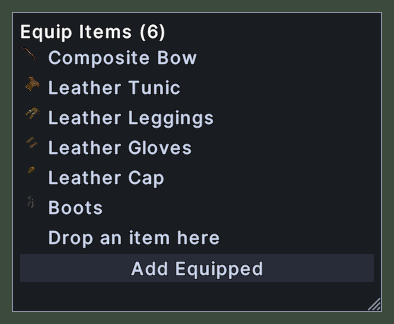
The equip items window edits the set of items that one hotbar slot puts on. Its title says how many items the set holds. Each item shows its picture and its name, and the last row is an empty place where you drop the next item.
The Add Equipped button at the bottom adds everything you are wearing now.
Opening it
- Shift+right-click a hotbar slot that holds an equipment set and choose Edit Item.
- Choosing Edit Item on another slot while the window is open moves the window to that slot.
- A right-click closes the window.
Using it
- Drag an item from your paperdoll or your backpack onto a row of the window to add it to the set. The item goes back where it came from.
- Click the empty row while carrying an item to add the item to the set.
- Click Add Equipped to add everything you are wearing.
- Hover over a piece to be told how to take it out. Hover over the empty row to read how to add an item.
- Shift+right-click a piece and choose Take out of the set to remove it.
- Roll the mouse wheel to scroll a long set.
- Drag the corner grip to resize the window.
- Right-click to close the window.