Global Chat Friends
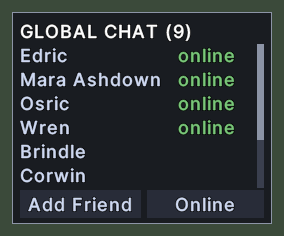
The Global Chat window is your friends list for Global Chat. The title says how many friends you have. Each row shows a friend's name, with the word "online" in green beside the friends who are online.
Friends who are online come first, and the rest follow in order of name. Two buttons stand at the foot. Add Friend adds someone, and the second button shows whether you are Online or Offline yourself.
Opening it
- The Friends action, in the Menu Actions group of the Actions window, opens the window and closes it again. You can put the action on a hotbar.
- The Friends entry in the chat menu opens it too. The chat menu opens from the button on the chat line, and from Shift+right-click on the chat.
- The window closes when you open it again from either, and a right-click anywhere on the window closes it.
Using it
- Click a friend to write to that friend. The chat line is set to that friend and the cursor goes into it.
- Hover over a friend to read a reminder of that click.
- Click Add Friend to add someone. The game then asks you for the name. It does nothing while you show as Offline.
- Click the Online or Offline button to change whether you show as available. The button's word is your state now.
- Shift+right-click a friend to remove that friend from the list. It does nothing while you show as Offline.
- Roll the mouse wheel over the list to scroll it.
- Right-click to close the window.
Changes
v1.0.0-alpha.1
- The chat has a menu for channels, Global Chat friends and ignore lists.