Name Plates
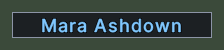
A name plate is a small label that floats over an item or a creature near you and tells you its name. Plates appear over nearby objects while you hold the key for object handles, so that you can find and pick out things in a crowded place. The client's settings choose which kinds of object get a plate, in Object Handle Filter, and how many plates show at once, in Object Handle Quantity. Both are on the Overhead page of the settings.
The name on a plate is in the colour of the object's notoriety. A name that is too long for the widest plate is cut at a word and ends in dots, and a hover shows all of it.




Opening it
- Hold Ctrl and Shift together. A plate appears over each object near you that the filter and the quantity allow.
- The plates go away when the client takes them down again.
- Right-click a plate to close that plate alone.
Using it
- Click a creature's plate to target the creature. Shift+click casts your quick-cast spell on it, and Control+click chooses that spell.
- Drag a creature's plate to pull off a health bar for the creature and drop it where you want it.
- Click an item's plate to target the item, and drag the plate to pick the item up.
- While the cursor waits for a target, a click on a plate answers it with that object.
- Double-click a plate to use the object.
- Hover over a plate to see the object's properties. The plate brightens and rises over its neighbours.