House Customization
The House Customization window is the designer that opens while you edit a house. It lists the walls, doors, floors, stairs, roofs, teleporters and other pieces that you can build with, and you choose a piece here before you place it in the world.
Each tab holds one kind of piece. Under it, each category has a heading, with the pieces of that category in rows below. A category you may look at but not build from has its heading in red, and a piece in it explains why when you click it. The foot of the window shows how many components and fixtures the design holds, with the most it may hold, and what the design costs.
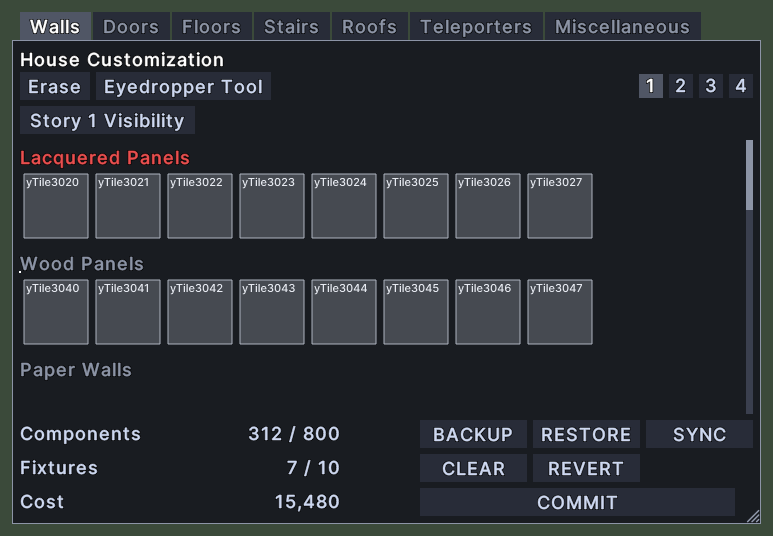
Opening it
- The window opens when you start customizing a house.
- Right-click an empty part of the window to close it and end the editing.
Using it
- Click a tab to see that kind of piece.
- Shift+right-click a tab for its menu. Choose Extract to take that tab out into a window of its own, and Re-Integrate to put it back. Extract is greyed out for the last tab in the row.
- Click a piece to choose it, and then click in the world to place it. A frame marks the chosen piece.
- Click Erase, and then click in the world, to remove a piece.
- Click Eyedropper Tool, and then click a piece in the world, to choose that piece. The list scrolls to it.
- Click a storey number at the top right to build on that storey. Hover over the number to read its name.
- Click the Story Visibility button, which names the storey you build on, such as Story 1 Visibility. Choose Walls, Floors or Roofs, and then Show, Transparent or Hide, to set how that kind of piece draws on that storey.
- Click + or - beside Roof to set the height of a roof. These appear when the Roofs tab is showing or a roof piece is chosen.
- The foot has five buttons that each send one command for the whole design. They read Backup, Restore, Sync, Clear and Revert in capital letters.
- Click COMMIT to build the design. If the design is not sound, a message says so.
- A count in the foot turns red when the design has reached its limit.
- Roll the mouse wheel over the pieces to scroll them.
- Drag the window to move it. Drag the corner grip to resize it. The size is remembered.