Map Legend
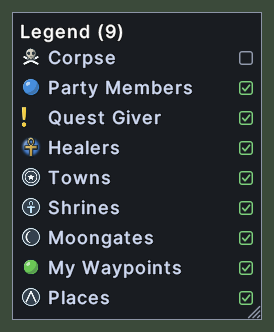
The map legend lists the kinds of marker that the map draws. Only the kinds that have a marker in the world the map shows get a row. Each row shows a kind's picture and its name, and a box at the right says whether the map draws that kind. The title counts the rows.
The last row is for the places that are built into the map, such as towns and shrines.
Opening it
- The Legend item in the map's menu opens the legend. The map's menu opens from the three dots on the map.
- The Legend action, in the Menu Actions group of the Actions window, opens and closes it. You can put the action on a hotbar.
- A right-click on the window closes it.
Using it
- Click a row to turn that kind of marker off on the map, or on again. The box shows a tick while the kind is on.
- Roll the mouse wheel over the list to scroll it, when the rows do not all fit.
- Drag the corner grip to make the window larger or smaller.
- Hover over a name that is cut off to read it whole.
- Right-click to close the window.
Changes
v1.0.0-alpha.1
- The map lists only your own waypoints, and has a find box and a legend.