Health Bar
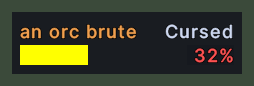
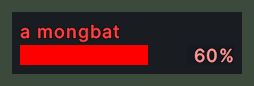
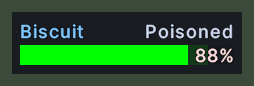
A health bar is a small window that follows one creature's health, and it stays on the screen where you drop it. It shows the creature's name in the colour of its notoriety, with a bar under the name and the percent of health left at the right end of the row.
The bar turns green when the creature is poisoned and yellow when it is cursed, and the word "Poisoned" or "Cursed" stands at the right end of the name's line. A frame appears around the bar while the creature is your current target. When the creature is out of range, the name turns grey and the bar empties.
Opening it
- Drag a creature from the game world, and drop the bar where you want it. Each creature gets one bar.
- Drag the name plate of a creature, while you hold the key for object handles, to pull a bar off the plate.
- A click that does not move the mouse does not make a bar.
- The Close all health bars action, in the Menu Actions group of the Actions window, closes every bar at once. You can put the action on a hotbar.
- A bar closes by itself when its creature is gone.
- Right-click a bar to close it.
- A bar is not remembered. After you log out, the bars are gone.
Using it
- Drag a bar to move it. With the Lock the layout setting on, a bar stays where it is.
- Click a bar to target its creature.
- Control+click a bar to choose the spell that a quick cast puts on the creature. Shift+click a bar to cast that spell on the creature.
- Double-click a bar to open the creature's paperdoll.
- Drop an item on a bar to give it to the creature.
- Hover over a bar to read a name that is cut off. An arrow also floats over the creature in the world.
- Shift+right-click a bar to open the server's menu for the creature.
- Turn on the Wheel resizes panels setting, and the mouse wheel over a bar makes every bar larger or smaller. The size is remembered.
- Right-click to close the bar.
Changes
v1.0.0-alpha.1
- The docks list the creatures near you as health bars, in tabs for everyone, the friendly, the hostile and your pets.