Organizer
The organizer moves items between your open containers by rules. A profile is a named set of rules, and each rule names one kind of item in one colour. A profile either files things away or fetches supplies, and it sends them to a bag that you choose, or to your backpack when you choose none.
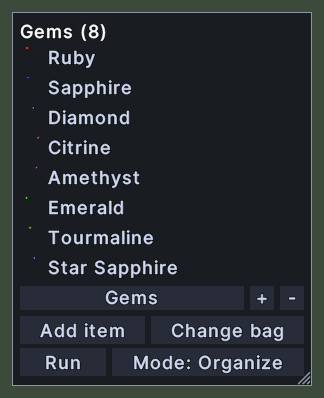
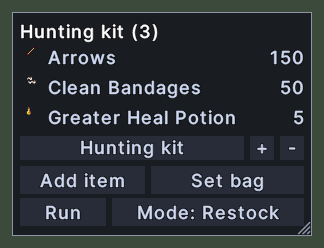
The window's title is the profile's name and how many rules it holds. Under the rules stand the profile picker with its two small buttons, and two rows of buttons: Add item and the bag button, then Run and the mode button.
In the Organize mode, the profile moves every item that a rule names into the bag. In the Restock mode, it fills the bag until it holds the count that each rule keeps, and each rule shows that count at the right.

Opening it
- The Organizer action, in the Menu Actions group of the Actions window, opens it and closes it again. You can put that action on a hotbar.
- Agents Settings in the main menu opens it.
- Agents in the paperdoll's menu opens it.
- The Organize or Restock button on a container opens it when the profile has nothing to move or no rules to run.
- A right-click closes the window. Closing it stops a sweep that it started.
Using it
- Click the profile picker to choose another profile from the list.
- Click the + button to make a new profile. Click the - button to delete the chosen profile and its rules.
- Click Add item, then target an item. Every item of that kind and colour is then collected by the profile.
- Click Set bag or Change bag, then target a container to send things there.
- Click Mode to switch the profile between Organize and Restock. Its rules stay.
- Click Run to start moving items from every open container. While it runs, the button reads Stop, and a click stops it.
- Hover over a button to read what it does.
- Shift+right-click a rule to forget it. In the Restock mode, the same menu also sets how many to keep.
- Roll the mouse wheel to scroll a long list of rules.
- Drag the corner grip to resize the window.
- Right-click to close the window.