Party
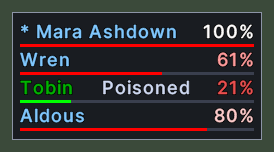
The party bar lists everyone in your party, with each member's health. Each row shows a member's name in the colour of their notoriety, with an asterisk before the leader's name. A bar under the name shows how much health the member has left, and the percent stands at the right end of the row.
The health bar turns green when a member is poisoned and yellow when a member is cursed, and the word "Poisoned" or "Cursed" stands beside the percent. When a member is out of range, the name turns grey and the health is left blank.
Opening it
- The bar opens by itself when you join a party, and it closes by itself when the party ends.
- The Party action, in the Menu Actions group of the Actions window, hides the bar and shows it again while you are in a party. You can put the action on a hotbar.
- A right-click closes the bar. It comes back the next time the party changes.
Using it
- Click a member to target them.
- Double-click a member to open their paperdoll.
- Drop an item on a member to give it to them.
- Control+click a member to choose the spell that a quick cast puts on them. Shift+click a member to cast that spell on them.
- Shift+right-click a member to open the server's menu for them, which holds the party commands.
- Right-click to close the bar.
Changes
v1.0.0-alpha.1
- The party bar shows each member's health.