Quantity
The quantity window asks how many items you want to take from a stack. It shows a box that holds a number, a slider under the box, and the buttons Okay and Cancel. The box starts with the whole stack, and the slider starts at its far end.
The window opens beside the pointer, so that it does not cover the stack you are dragging from.
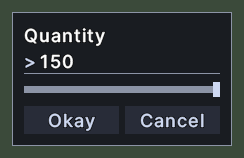
Opening it
- The window opens when you drag from a stack and the client asks how many to take. Whether it asks depends on the client's setting about holding Shift to split a stack.
- Control+drag on a stack in a container takes one item at once, and no window opens.
- The window closes when you answer it, whether you take some items or cancel.
Using it
- Type a number in the box. The box is ready for typing, with its number selected, so that your first key replaces the starting value.
- Drag the slider to choose an amount. The box shows the number that the slider stands on. A small stack has a stop for each item.
- Typing in the box moves the slider to match.
- Click Okay, or press Enter, to take that many items. An amount larger than the stack takes the whole stack.
- Click Cancel, or press Escape, to take nothing. A box that holds 0 also takes nothing.
- Right-click anywhere on the window to cancel.
- Drag the window by its background to move it.