Quick Stat
A quick stat is a small readout of one stat from the character sheet, kept on the screen where you put it. It shows the stat's picture, its name and its current value, such as your weight, your gold or one of your resistances.
You can keep as many readouts as you like. They stay where you left them, and they come back when you log in again.

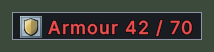
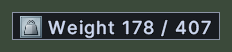
Opening it
- Control+click a stat in the Character Sheet window. The readout appears above and to the left of the pointer. Control+click the same stat again to take its readout away.
- The readouts you made come back when you log in.
- A right-click on a readout takes it away and forgets it.
Using it
- Drag a readout to move it.
- Hover over a readout to read its name. The hover also says that Shift+right-click opens its menu.
- Shift+right-click a readout to open its menu.
- Choose Rename in the menu to give the readout a name of your own. An empty name brings back the stat's own name.
- Choose Set Amount Warning in the menu to set a percent. The readout turns red while the stat is below that percent of its highest value. A stat with no highest value cannot be given a warning, and its menu entry is dimmed.
- Choose one of the Set Value Color entries in the menu to draw the readout in another colour. The colour is kept, but a warning turns the readout red over it. The entry in use is ticked.
- Choose Destroy Label in the menu to take the readout away.
- Right-click to take the readout away.
Changes
v1.0.0-alpha.1
- The character sheet lists your stats in four groups under a find box, and a stat can be shown on screen as a Quick Stat.