Change Race
The race-change window lets you choose a new look for your character when you use a race-change token. It is headed with the race you are changing to, such as "Change Race To Human". On the left are the choices, and on the right the game draws your character with each choice as you make it.
The choices are the skin tone, the hair style and colour and, for a male human or a male gargoyle, the facial hair style and colour. A gargoyle has horns in place of hair, so its choices are horn style and colour. Each colour has a row of swatches, and a bar beside the heading shows the colour chosen. Each style has an arrow at either end of its name.
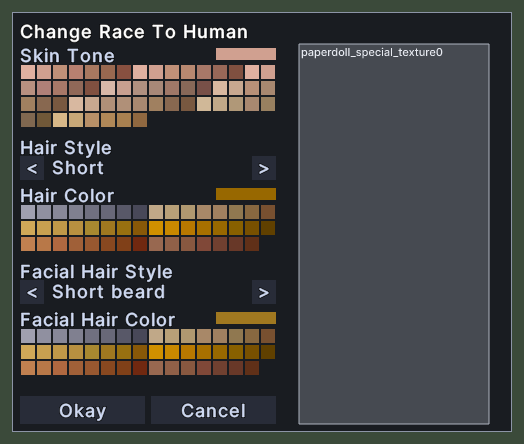
Opening it
- The window opens when you use a race-change token.
- Okay changes your character to the look you chose and closes the window.
- Cancel closes the window and changes nothing.
- A right-click anywhere on the window does the same as Cancel.
Using it
- Click a colour swatch to choose it.
- Click the arrow before a style's name to go to the previous style, and the arrow after it to go to the next. At either end the list wraps around.
- Click Okay to change your character to the look you chose.
- Click Cancel to close the window without changing anything.
- Right-click to cancel.