Skills
The skills window lists every skill your character has. Each row shows the skill's picture and name, its real value, the cap it can reach and a bar of how far the value has come toward that cap. A lock at the right end of the row says whether the skill may rise, may fall or is held where it is. The foot of the window shows how many skill points you have used out of the total.
When a skill is raised or lowered by gear or a spell, the change stands beside the value, in green for a gain and red for a loss. A skill with an auto-lock value shows that value in place of its cap, and the bar fills toward it.
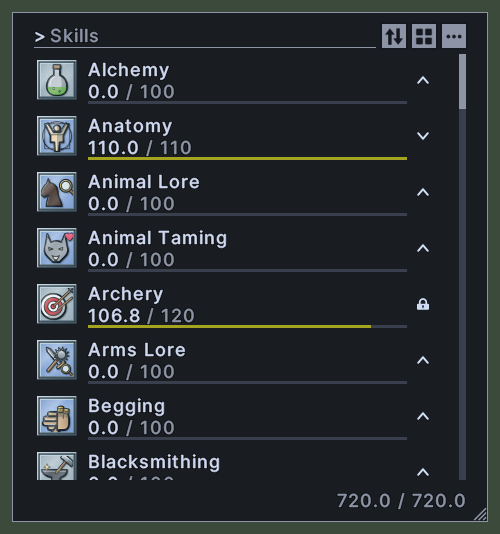
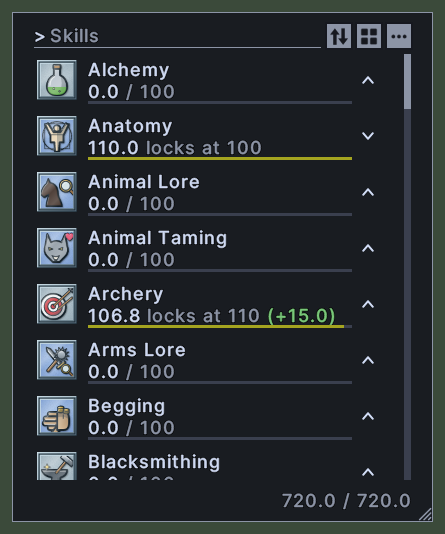
Opening it
- The Skills Window key in the client's key settings opens the window and closes it again.
- The Skills action, in the Menu Actions group of the Actions window, opens or closes it. You can put the action on a hotbar.
- On your own paperdoll, click the three dots at the top right and choose Skills.
- A right-click anywhere on the window closes it.
Using it
- Type in the box at the top to show only the skills whose names match. Press Escape to empty the box.
- Click the sort button to choose an order: by name, by real value, by modded value or by cap, each one upward or downward. The menu ticks the order in force.
- Click the view switch to change between the list and a grid of pictures. The window remembers your choice.
- Click the three dots to set every skill's lock at once: all locked, all up or all down.
- Click a skill's lock to change it. Each click moves it to the next of three states: up, down and locked.
- Double-click a skill to use it, if it is one that can be used.
- Drag a skill onto a hotbar to keep it there.
- Hover over a skill in the grid to read its name, its real and modded values, its cap, its auto-lock value and its lock.
- Shift+right-click a skill to open its menu. It sets the skill's lock, sets or clears an auto-lock value, and adds or removes the skill from the skill tracker.
- Roll the mouse wheel over the list to scroll it.
- Drag the window to move it.
- Drag the corner grip to resize the window.
- Right-click to close the window.
Changes
v1.0.0-alpha.1
- The Skills window has a find box and shows a list or a grid of pictures. A skill can be given an auto-lock value.