Status
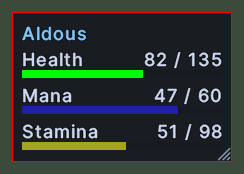
The status window shows your character's name, health, mana and stamina. Each of the three has its name and its value at the top of a row, with a bar under it that shrinks as the value falls. Your name is drawn in the colour of your notoriety.
The health bar is red, turns green when you are poisoned and turns yellow when you are cursed. The frame around the window turns red while you are in war mode.
Opening it
- The window opens when you log in.
- The Status action, in the Menu Actions group of the Actions window, opens or closes it. You can put the action on a hotbar.
- On your own paperdoll, click the three dots at the top right and choose Status.
- Drag your own character out of the game world to open the window under the pointer.
- A right-click anywhere on the window closes it.
Using it
- Click the window to target yourself.
- Drop an item you are carrying on the window to drop it on your character.
- Drag the window to move it.
- Drag the corner grip to make the window larger. The bars take up the new width and the rows take up the new height.
- Shift+right-click the window to open a menu with Call the guards, which says "Guards! Help me!" aloud.
- Right-click to close the window.
Changes
v1.0.0-alpha.1
- The status window shows your health, mana and stamina, and its frame turns red in war mode.