Harvest With
The Harvest with window sets up a hotbar slot that aims a tool at a kind of resource, such as a pickaxe at ore. The first row holds the tool. The rows under it list what that tool can gather, and a tick marks the one the slot aims at.
Until a tool is chosen, the first row reads "Drop a tool here" and no resources are listed.
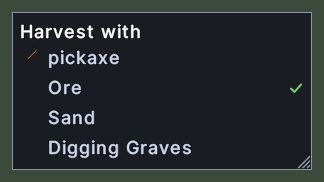
Opening it
- Shift+right-click a hotbar slot that holds the harvest action, and choose Edit Item.
- Right-click the window to close it.
Using it
- Drop a tool on the first row to bind the tool to the slot. The slot then aims at the first resource that the tool can gather.
- Click a resource to aim the slot at it. The tick moves to that row.
- Hover over the first row to read how to set the tool.
- Right-click the window or a row to close it.
- Drag the window to move it. With the Lock the layout setting on, it stays where it is.
- Drag the corner grip to resize the window.
- Roll the mouse wheel over the rows to scroll them.