Trade
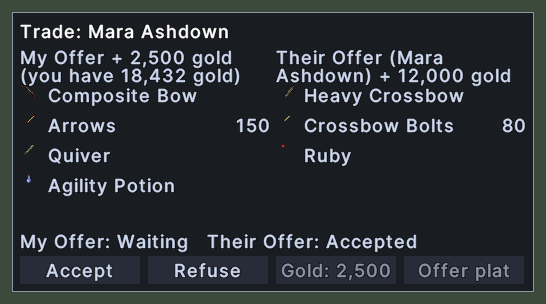
The trade window is where you and another player swap items and gold. Your offer stands on the left, and the other player's offer stands on the right. Each side lists its items with their pictures and the count of each stack. Above each list, the heading says how much gold is offered with it. Your heading also says how much gold you have.
The title names the player you are trading with. A line under the lists says whether each side has accepted or is still waiting. The buttons Accept, Refuse, Offer gold and Offer plat stand at the foot.
Opening it
- The window opens when you start a trade with another player, or when another player starts one with you.
- The window closes when either side refuses, or when both sides have accepted and the trade is done.
- Refuse closes the trade for both players.
Using it
- Drop an item from your pack or from the ground on the window to put it in your offer. It goes in your list wherever you drop it.
- Click Accept to accept the trade. The button then reads Cancel, and a click on it takes your acceptance back. The trade is done when both sides have accepted.
- Hover over Accept to read the server's warning to check inside every container first.
- Click Refuse to end the trade without trading.
- Click Offer gold, or Offer plat for platinum, to type an amount to offer. An amount above what you have is brought down to what you have. An amount of 0 takes your offer back. After you make an offer, the button shows the amount.
- The two offer buttons do nothing once either side has accepted.
- Double-click an item, on either side, to use it. This opens a bag so that you can look inside before you accept.
- Hover over an item to read its name and its properties.
- Hover over a name that is cut off to read it whole.
- When a side offers more items than fit, a pager under that side's list turns the pages.